People Power Calling Guide
Why do we make phone calls?
Thanks for making calls with ACLU People Power!
All year, our ACLU People Power call team makes calls to mobilize People Power supporters and voters on critical issues and campaigns happening nationwide. Our efforts include making rapid-response calls when urgent action is needed, like rallying against ICE’s separation of parents and children, or calling voters and turning out our base to vote in critical elections. Sometimes we’ll stick with one campaign for a week at a time, other times we’ll have new campaigns every day, but all of them are critical to protecting civil rights and liberties in the United States.
But, why phone calls? Research shows that person-to-person conversations are most likely to motivate someone to take action. There are civil rights and liberties issues at stake across the country, and the way that we can make a difference – no matter where we live – is by having meaningful conversations with voters, supporters, and activists over the phone.
Thank you for taking the time to make a difference!
Our Tools
We use two tools to power our team:
ThruTalk: The system we use to make calls. ThruTalk is only available as a website; there is no app. Since we use a website to make calls, your own phone number will never be visible or public.
Slack: Our virtual campaign office where we post the day’s calling assignments. Slack is a way of communicating with staff and other volunteers in real time, including accessing information about call team opportunities, asking questions or asking for help, and providing feedback. Slack is available as a website, a mobile app, and a desktop app. New to Slack? Check out their Getting Started Guide.
Getting Started
- Submit a volunteer signup form: Submit this online form to join People Power Call Team and receive emailed instructions to create a login to our tools, Slack and ThruTalk.
- People Power Calling Guide: Read our People Power Calling Guide (this page!) and bookmark this link for future reference.
- ThruTalk Training Video: Watch this short video to learn the basics of making calls with our tool, ThruTalk.
You’re all set! Announcements are made in the People Power Slack when calls are available, just check in on the #call-team channel. Email us at info@peoplepower.org if you find you still have questions or would like to request a training.
Links to Bookmark
| Log into Slack & #call_team channel | peoplepowered.slack.com |
| Training guide: (this guide!) | https://www.aclu.org/people-power-calling-guide |
| Email us with any questions | info@peoplepower.org |
How to use ThruTalk
In order to make calls quickly and efficiently, we use a platform called Thrutalk which has just recently been totally updated to be better than ever. We’re still getting to know this new system and we’re grateful for your help as we do. Essentially, this system allows you to “dial in” to an online system where ThruTalk employees place the calls for you extremely quickly, enabling you to only be connected to folks who actually answer the phone. (A few voicemails may sneak through, but for the most part you’ll only be connected to live people.) This system also protects your personal number and also allows you to connect with over 10 times more people on the phone in an hour-long shift than dialing by hand.
Here’s a 2-minute video to give you a quick overview of how ThruTalk works.
Here are the quick, easy steps to take to make calls with us:
- In order to make calls in ThruTalk, you will need a laptop, desktop, or tablet. (iPads are not supported.) Audio can be connected through the computer using headphones or the internal microphone or via a landline or cell phone — we recommend using a phone with your computer for better sound quality and having a headset to make your calling experience more comfortable.
- When you are ready to make calls, head to Slack to find the URL that will connect you to today’s calls.
- The “Calling” link at the top of your page will bring you to your main calling campaign page.

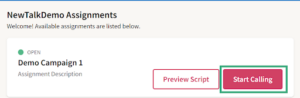
- Find the calling assignment, then click on the “Start Calling” button on the right side.
- You’ll be asked “how would you like to make calls?”
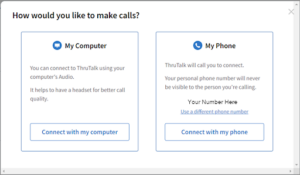
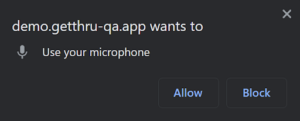
- To make calls on your computer, click “Connect with my computer.” If this is your first time making calls on your browser or if you’ve cleared your browser data, ThruTalk will need permission to use your microphone. Click “Allow” on the pop-up.
- Alternatively, you can call using your phone by clicking “Connect with my phone,” and we will call you to establish a connection.
- Once you’re prepped to make calls, click on the “Ready to Make Calls” button.
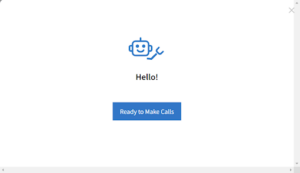
- Sit tight while ThruTalk makes calls and finds someone for you to talk to!
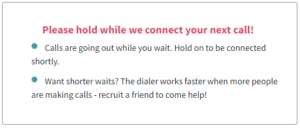
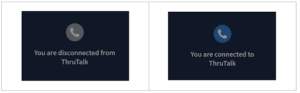
- While waiting to be connected, the Status indicator on the left will show as Not Connected.
- When a call connects, the status indicator will change to Connected and the name of the contact will be visible. You should start talking to your contact as soon as you can see the screen change.
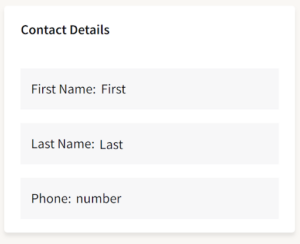
- Once connected, you will see contact details on the right.
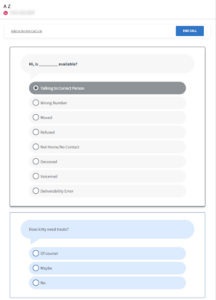
- Each of your script questions will be in the center of the screen. Scroll down to read through each question as the conversation progresses. Click on an answer in each question to move to the next question in the script.
- Once you’ve reached the end of your script, you will see this message:
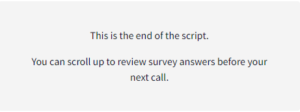
- Once the script has been finished, you can click the blue “END CALL” button at the top right of your screen. You can scroll through the script and make any changes if necessary.
- If the target has hung up, you will hear an audible disconnected tone, and the status indicator on the left will switch back to Not Connected.
- If the target you’ve spoken to wants to prevent future calls from your organization, you can click on “Add to Do Not Call List.” You will also be able to click this button during and after the call has ended.
- When you’re ready, click “Ready for Next Call” to resume dialing.
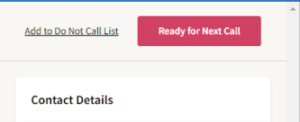
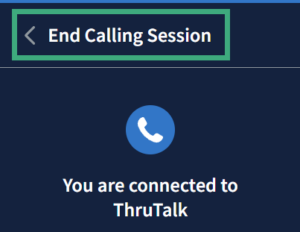
- If you are done calling, click on the “End Calling Session” in the top left of your screen.
- If you do not know the answer to something, do not guess – have them email us at info@peoplepower.org
- Do you have other questions about ThruTalk? Check out these how-to guides for more info, or reach out to one of the leads on Slack!
Thanks for joining us in the fight for civil rights and civil liberties nationwide! We look forward to working with you.
Tips & tricks for calling
Calling can be scary the first time you try it! Here are some tips and tricks from our most experienced volunteers to help you get going successfully.
Smile! Trust us, people can hear it in your voice.
Engage. Remember to engage the people you call by asking “how are you today.” People who engage with you are more likely to listen to what you have to say and respond.
Make it personal. If someone is undecided, tell them why YOU are passionate about the issue. This will make your calls more interesting for you and more memorable for the person at the other end.
Feel free to share your experiences with other folks in the Slack channel! Tell us when you’ve had a successful call, ask questions, and use the other volunteers as a resource and as a support system. We’re all in this together!
Set reasonable expectations. Expect to talk to some folks who wish not to engage. This is normal! Your overall goal is number of conversations. The more phonebanking you do, the more people you will have conversations with.
Don’t worry too much about the reactions of people you call. Think about phone banking as a scripted set of interactions in which both parties know the rules of the game. Some folks you call will choose to play along, others won’t. Whether or not the person engages is not a reflection on you.
Always take the high road, regardless of the tone used by the other person. If you are not comfortable conversing with someone due to their tone, that’s okay! Politely end the conversation, and if you need to decompress, share in the channel. We’re all here to support each other. We never debate with the folks that we call.
Be confident! Try not to rush through your script. Speak clearly. If you feel like the script is too long, let us know.
Be proud of yourself! You are helping ACLU People Power defend and protect civil rights and liberties. Give yourself a pat on the back after every shift. You deserve it!
Frequently asked questions
Q: Do I have to make these calls with a cell phone?
A: Nope! All of our systems are compatible with cells and landlines, and you can also call through your computer. As long as you have any working phone and a connection to the Internet, you can make calls with us!
Q: Can I call from my laptop or tablet?
A: Yes!
Q: Will the people I call see my phone number?
A: No. This system protects your privacy by masking your phone number with a generic one. This also means you won’t have to deal with folks calling you back, since the only number they will have is that generic phone number we set up.
Q: Do I need to log into ThruTalk on my cell phone?
A: No. You log into Thrutalk on your computer, and then if you choose to link your phone, ThruTalk will call you and enable you to connect your mobile or landline phone. After that, you won’t need to touch your phone again until you’re ready to finish calling for the day.
Q: How do I hang up on a call?
A: Click the “end call” button on the upper right hand corner of your screen in ThruTalk.
Q: How many calls are we expected to make?
A: As many as you can make! We hope you’ll join us for a 2 hour shift, but as long as you can call, we appreciate the help. The system will generate numbers more quickly as we have more callers on, so you’ll be making between 75 and 300 calls per hour without even doing anything!
Q: If we mark “no answer” or “voicemail” do those same names appear on the list again shortly after that? A couple of names popped up several times and I didn’t know if it was the same person or different people with the same name.
A: Yes, those names do get put back in the list, but only after everyone on the list has been called once. It would be unusual for you to have gone through the entire list in one shift, so chances are they were different people with the same names.
Q: How do we code answering machines? Not home or no answer?
A: With ThruTalk, you shouldn’t be connected to answering machines — however this may happen occasionally if the system mistakes an answering machine for a real person. Just mark them as not home and end the call using the button in the upper right corner of the screen.
Q: What do I do if someone wants to be removed from our calling list?
A: If the target you’ve spoken to wants to prevent future calls from your organization, you can click on “Add to Do Not Call List.” You will also be able to click this button during and after the call has ended.
Q: How do I respond to someone who says that they don’t have time to talk now but wants to call me back?
A: Our system masks your number to protect your privacy so they can’t call you back. Please encourage them to email us at info@peoplepower.org and someone will be in touch with them. You should also mark them as “not home” so their name will go back into the list, and hopefully they’ll get a call back later.
Q: I talked to someone who is undecided but willing to receive more information via email. Where and how do I record their email for this purpose?
A: If there isn’t a space for you to put their email within the script, send it in the #call-team channel on slack with a note that they want information, and inform them that they can send an email to info@peoplepower.org and someone can get back to them with more information ASAP. Make sure you also go to the call team slack channel and let the call team lead know. You can use the Direct Message feature on Slack to send the call team lead the person’s name and email so they can make sure they get updates.
Q: What do I do if someone wants to argue or is hostile on the phone?
A: While many of our campaigns are contacting People Power members who are generally supportive of the campaigns we work on, sometimes our lists include a wider scope of folks, including people who we might not usually expect to be on our side. That means sometimes we get people who don’t agree with us! It’s important to be prepared to respond with grace and tact. Don’t try to argue with people. If someone wants to get into a heated debate with you on the phone, politely end the conversation and move on to your next call. If you’re calling about something related to an election, please remember that the ACLU is non-partisan – meaning that we don’t endorse candidates.